
0、升级插件
Debian和Ubuntu:
apt update -y && apt install -y curl
其他:
yum update && yum install -y curl
dns64
https://www.nodeseek.com/post-13846-1
cp /etc/resolv.conf /etc/resolv.conf.bak
echo -e “nameserver 2a01:4f8:c2c:123f::1\nnameserver 2a00:1098:2c::1\nnameserver 2a01:4f9:c010:3f02::1” > /etc/resolv.conf
warp
wget -N https://gitlab.com/fscarmen/warp/-/raw/main/menu.sh && bash menu.sh 4
安装Alice v4出口
curl -L https://raw.githubusercontent.com/hkfires/onekey-tun2socks/main/onekey-tun2socks.sh -o onekey-tun2socks.sh && chmod +x onekey-tun2socks.sh && sudo ./onekey-tun2socks.sh -i alice
一键多落地
bash <(wget -qO- https://raw.githubusercontent.com/wuzf/ArgoXForAlice/main/argox.sh)
1、vps测试以及faiban安装
bash <(curl -sL https://sh.nodeseek.com)
2、系统重装(国外服务器)
https://raw.githubusercontent.com/bin456789/reinstall/main/reinstall.sh || wget -O reinstall.sh $_bash reinstall.sh debian 11 --password cjx123456 --hold 2
参考GitHub:https://github.com/bin456789/reinstall
bash reinstall.sh anolis 7|8|23
rocky 8|9
oracle 8|9
almalinux 8|9|10
opencloudos 8|9|23
centos 9|10
fedora 41|42
nixos 25.05
debian 9|10|11|12
opensuse 15.6|tumbleweed
alpine 3.19|3.20|3.21|3.22
openeuler 20.03|22.03|24.03|25.03
ubuntu 16.04|18.04|20.04|22.04|24.04|25.04 [–minimal]
kali
arch
gentoo
aosc
fnos
redhat –img=”http://access.cdn.redhat.com/xxx.qcow2″
3、vps调优
apt update -y && apt install -y curl
bash <(curl -sL kejilion.sh)
4、v2bx
wget -N https://raw.githubusercontent.com/wyx2685/V2bX-script/master/install.sh && bash install.sh
失败后可以直接版本
bash install.sh v0.2.4
5、调优
sysctl net.ipv4.tcp_wmem
可以查看一下调优之前的数值
然后开始调优,先把sh自动调优脚本上传到vps的root文件夹之下
sed -i 's/\r$//' /root/tcp.shchmod +x /root/tcp.shfree -hmem显示978MI,则为1
sudo apt-get updatesudo apt-get install curl -ycurl -s https://packagecloud.io/install/repositories/ookla/speedtest-cli/script.deb.sh | sudo bashsudo apt-get install speedtest -yspeedtestdownload取整,例如375Mbit/s则为370
rss为本地windows不开代理cmd ping vps的ip最后一行的最后一个平均数字214

/root/tcp.sh【教程】教你如何连接IPv6 only的小鸡

Aixleft楼主
639days ago edited 639days ago in 技术
首先我们需要使用到一个开源项目:tcp2ws,地址:https://github.com/rust-net/tcp2ws,(可以点个star支持一下作者,也就是我)
然后,你需要有一个托管在CF的域名,下面用xxx.xyz来示范
下载并启动:
wget 'https://proxy.my-api.workers.dev/proxy?proxyUrl=https://github.com/rust-net/tcp2ws/releases/download/1.0/tcp2ws-x86_64-linux-musl' -O tcp2ws
chmod +x ./tcp2ws
./tcp2ws server -p 22 -l [::]:8080
最后在自己电脑上下载:tcp2ws.zip,双击进入配置页面添加配置:
然后就可以通过 127.0.0.1:2222 连接啦!

serok楼主
1day ago edited 22h 44min ago in 技术
基础玩法 Alice free only v6 设置简略
- CF解析v6地址,关闭小黄云(教程跳过)
- SSH登录,安装专用v4出口
- 安装3xui,申请面板证书
- 登录3xui面板,搭建5个节点
- 设置出站规则
- 设置路由规则
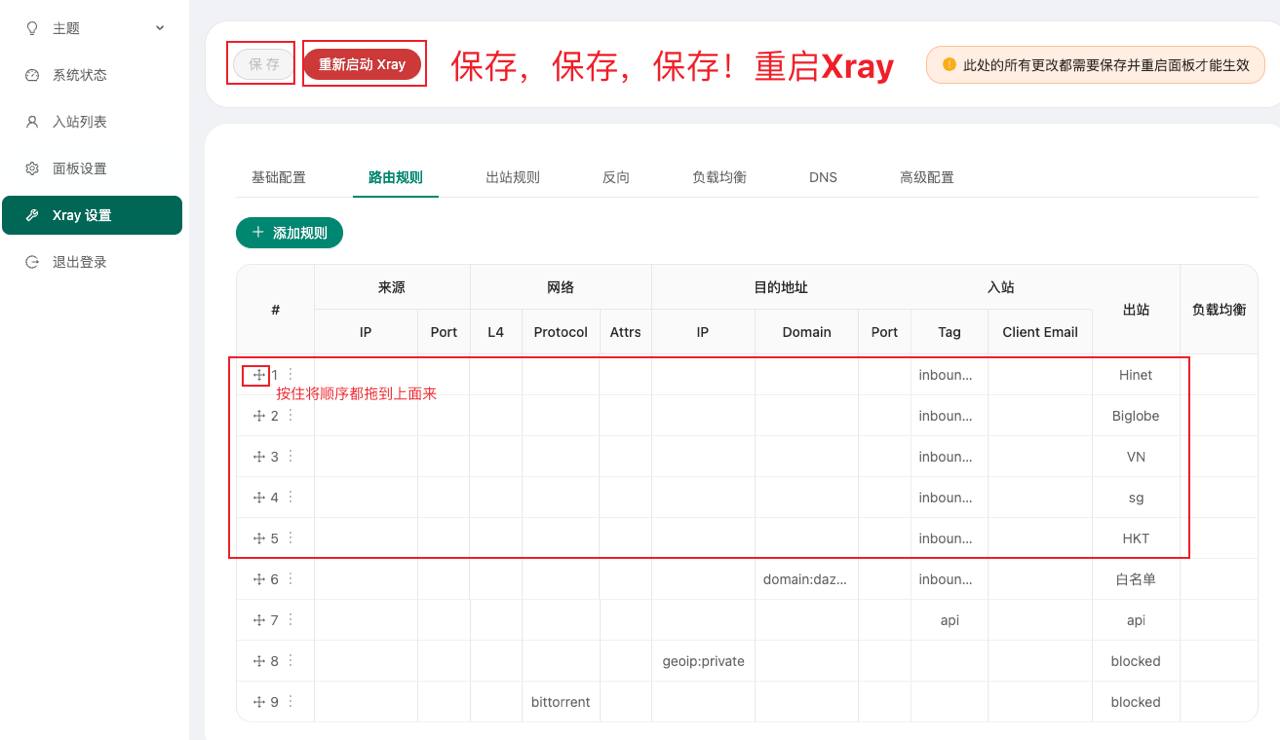
- 保存并重启3xui面板
安装大佬V4出口:Github项目直通
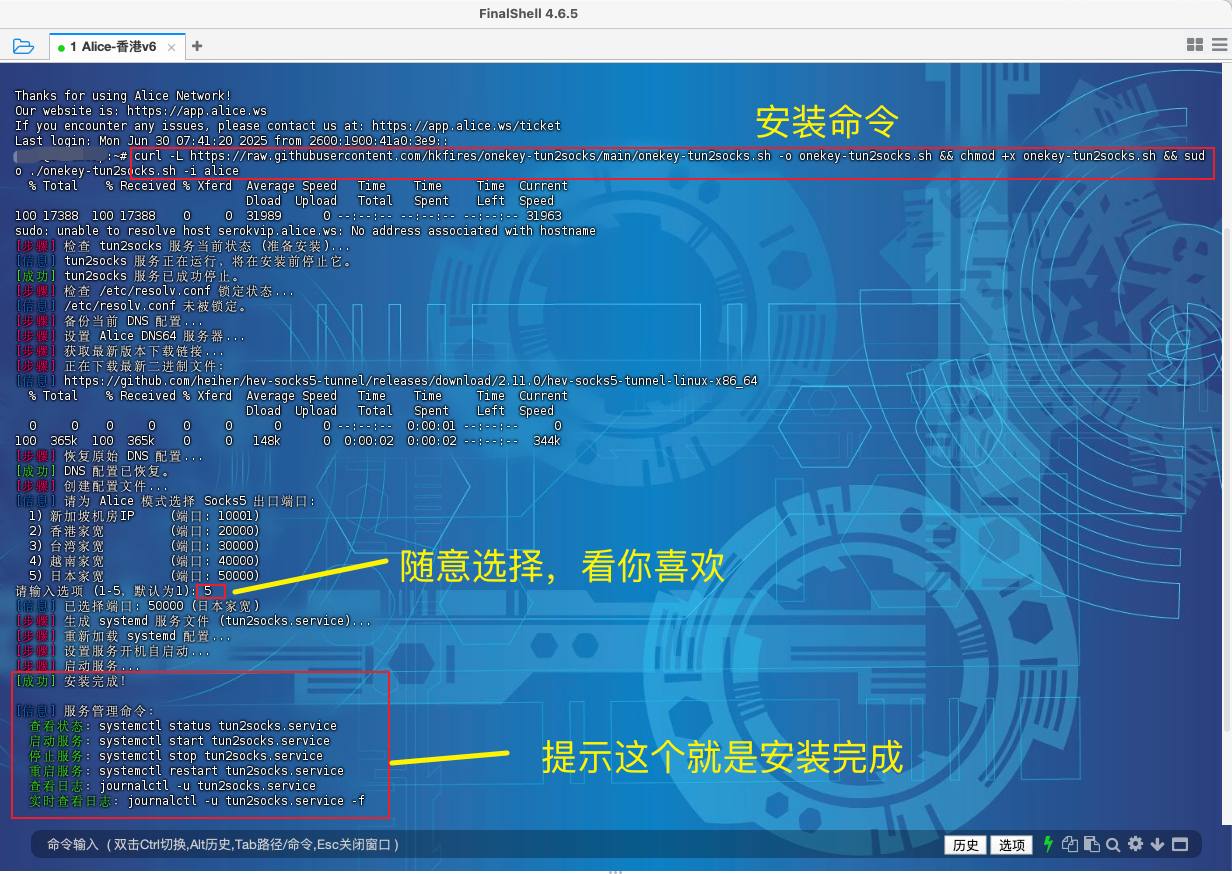
1、登录ssh(跳过),输入下面命令安装,选择1-5都可以,随意。安装超时报错的先安装 Warp 给 V4 后再安装 便可解决
curl -L https://raw.githubusercontent.com/hkfires/onekey-tun2socks/main/onekey-tun2socks.sh -o onekey-tun2socks.sh && chmod +x onekey-tun2socks.sh && sudo ./onekey-tun2socks.sh -i alice
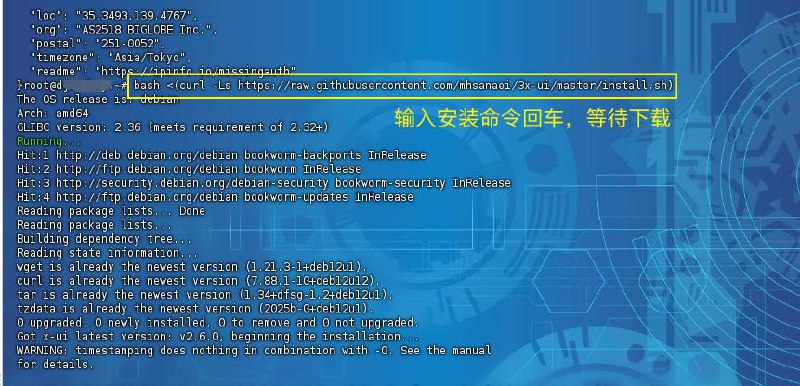
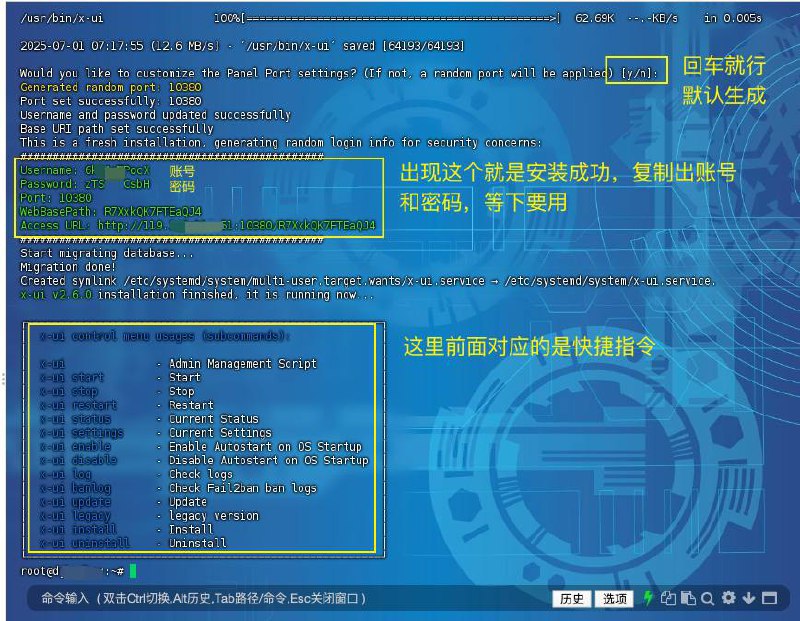
2、安装3xui,官方脚本安装,过程中都默认按回车就行
bash <(curl -Ls https://raw.githubusercontent.com/mhsanaei/3x-ui/master/install.sh)
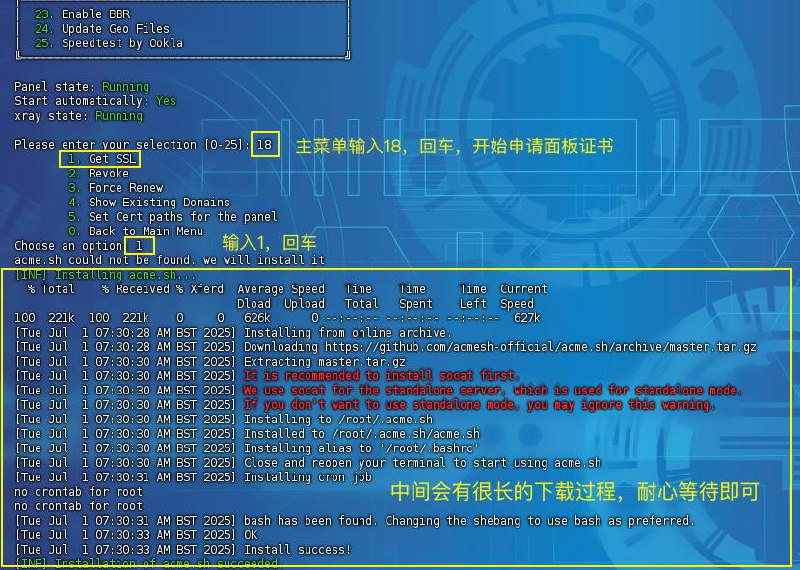
2.1、输入
x-ui进入控制面板,开启bbr
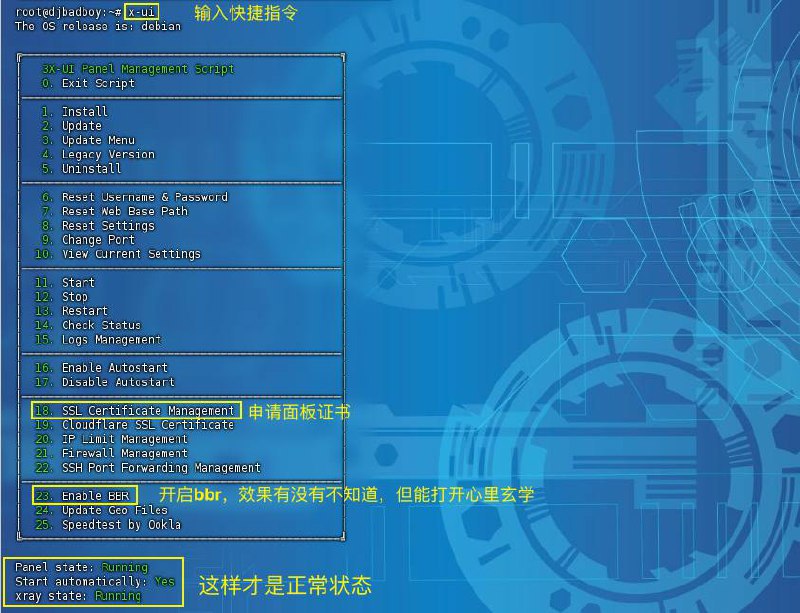

2.2、返回主菜单,输入
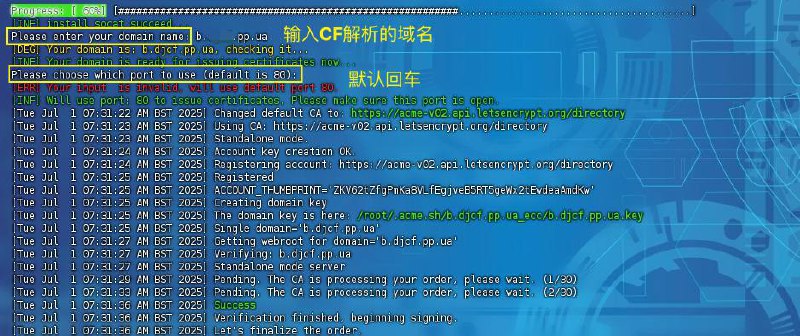
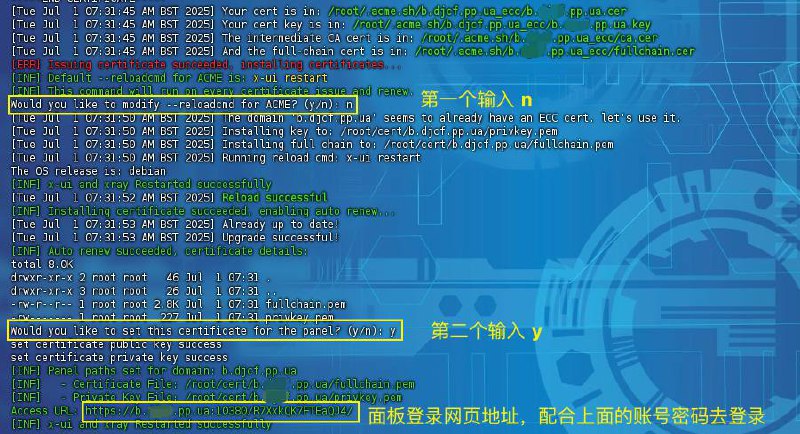
18申请证书
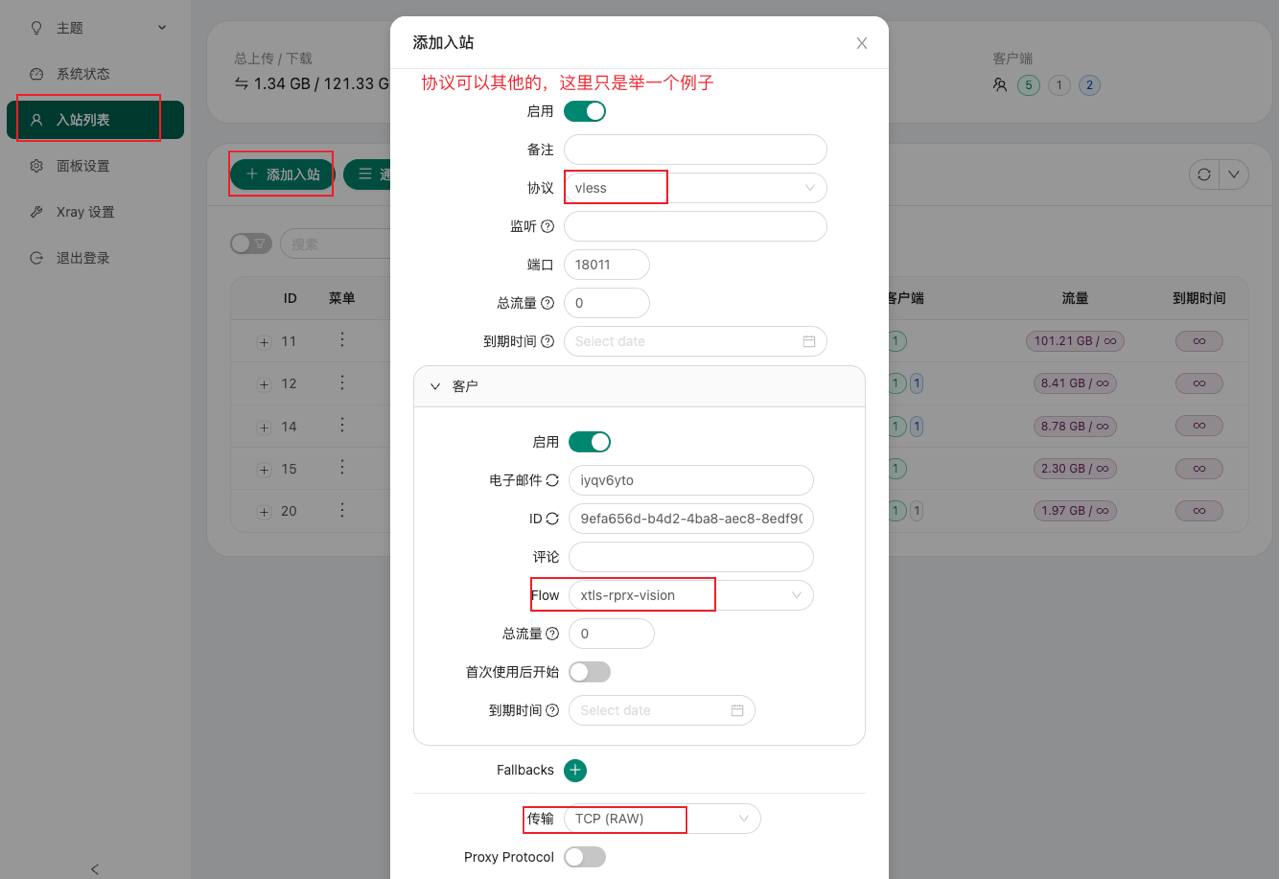
3、登录3xui面板,搭建5个节点
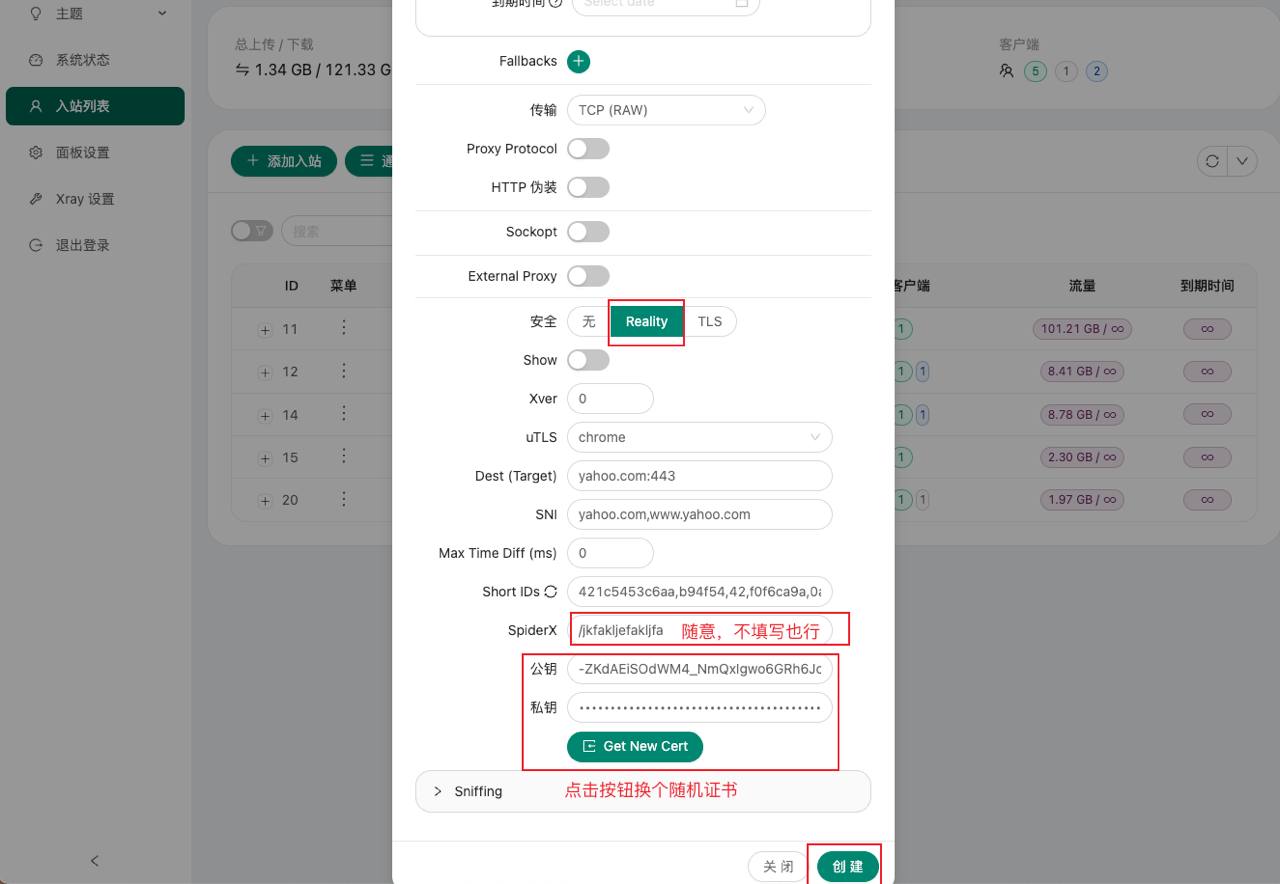
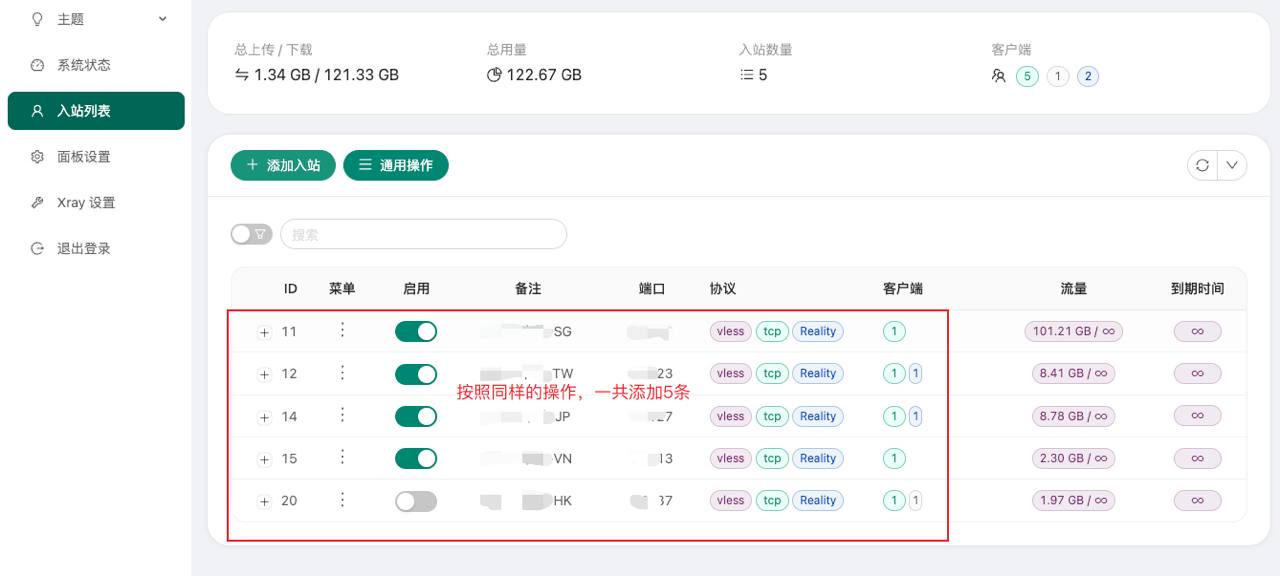
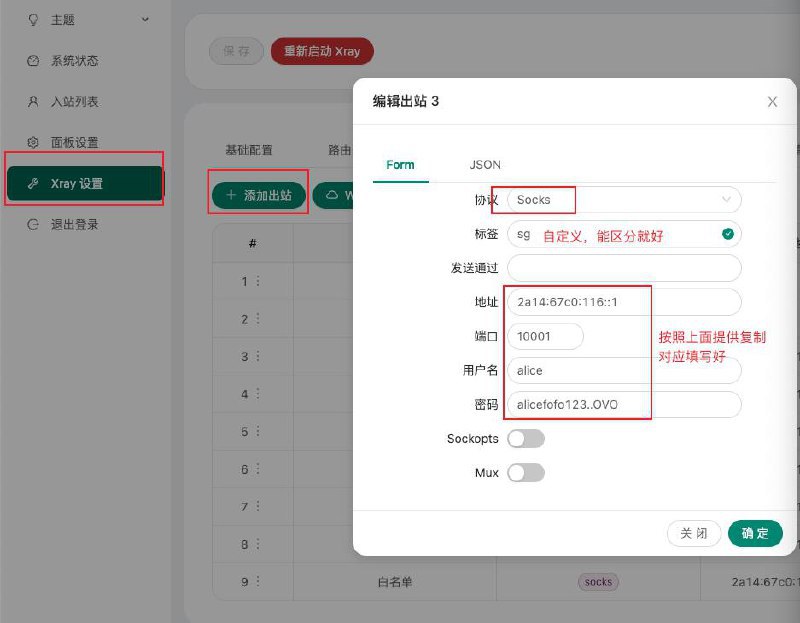
4、Xray设置添加设置出站规则,这里采用官方的socks,对应设置5条规则
Sokcs5出口已更新优化
IP: 2a14:67c0:116::1
用户名 :alice
密码 :alicefofo123..OVO
端口 :
     10000 HK
     10001 SG
     20000 HKT
     30000 Hinet -> new
     40000 VN
     50000 Biglobe
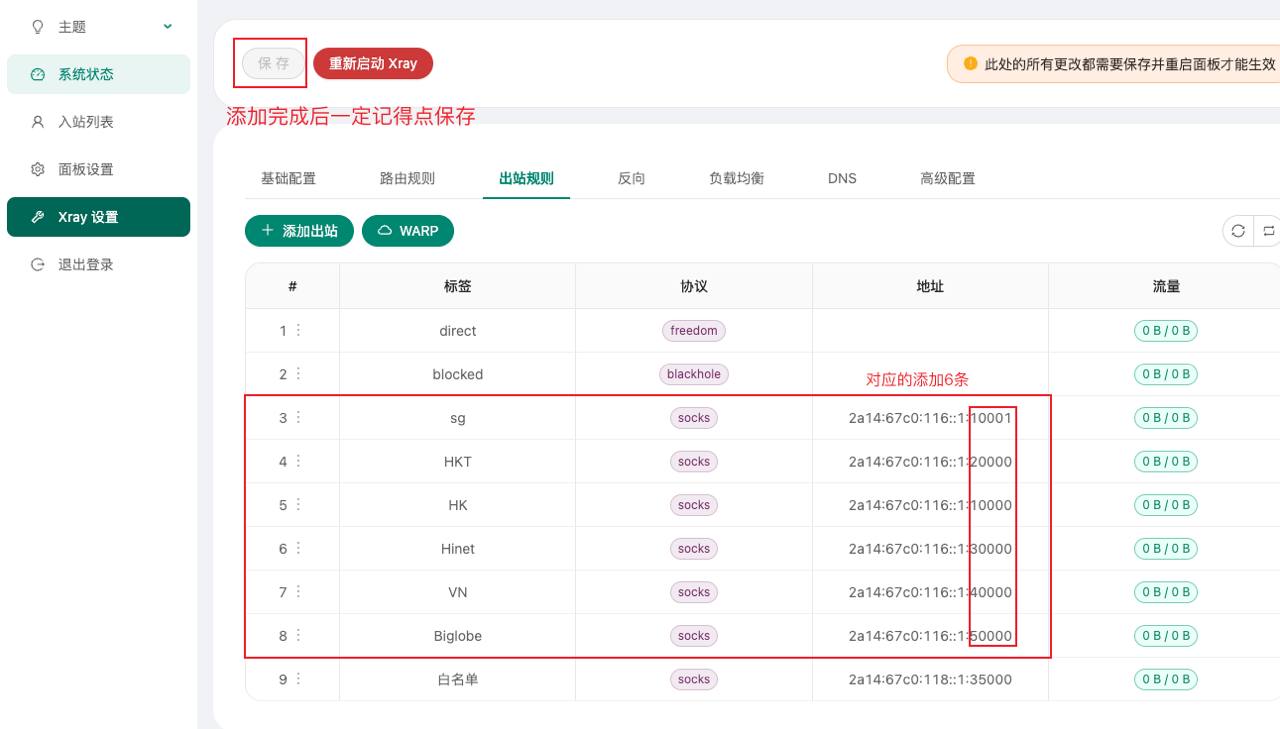
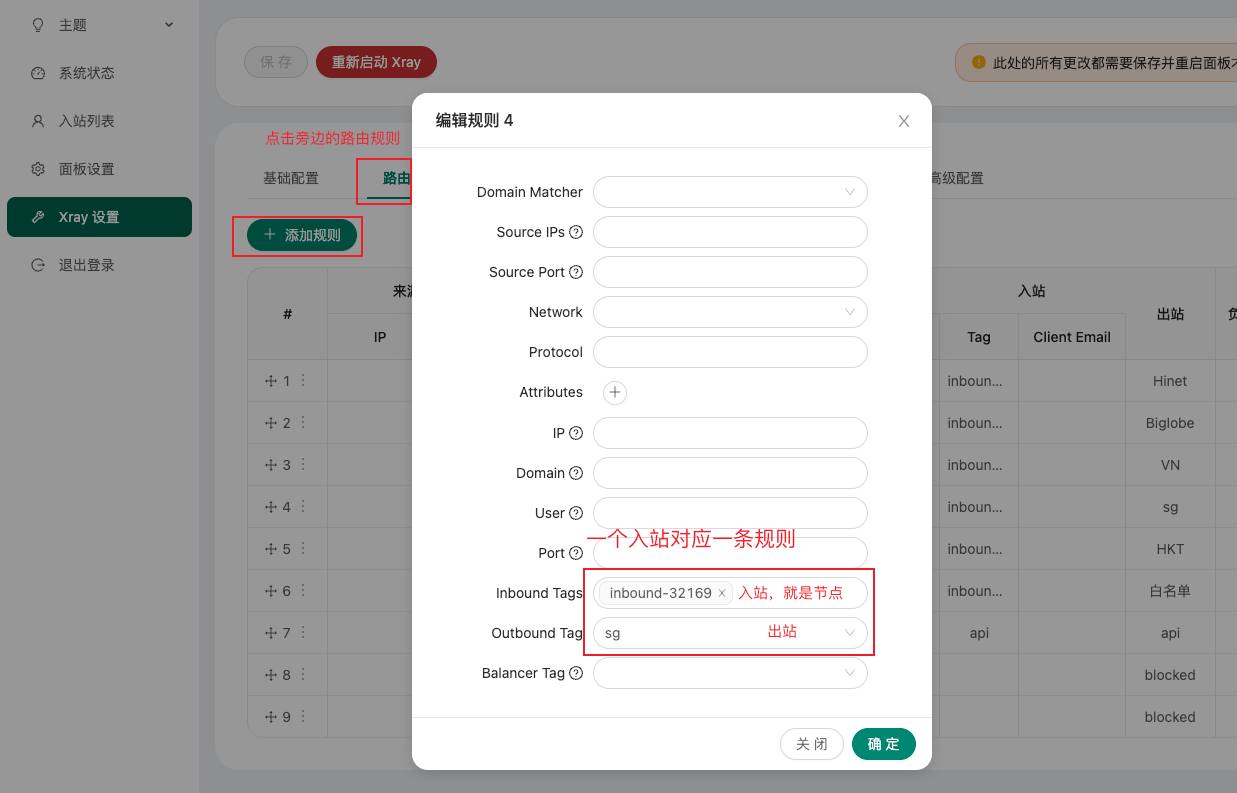
5、设置路由规则,一个节点对应一条规则
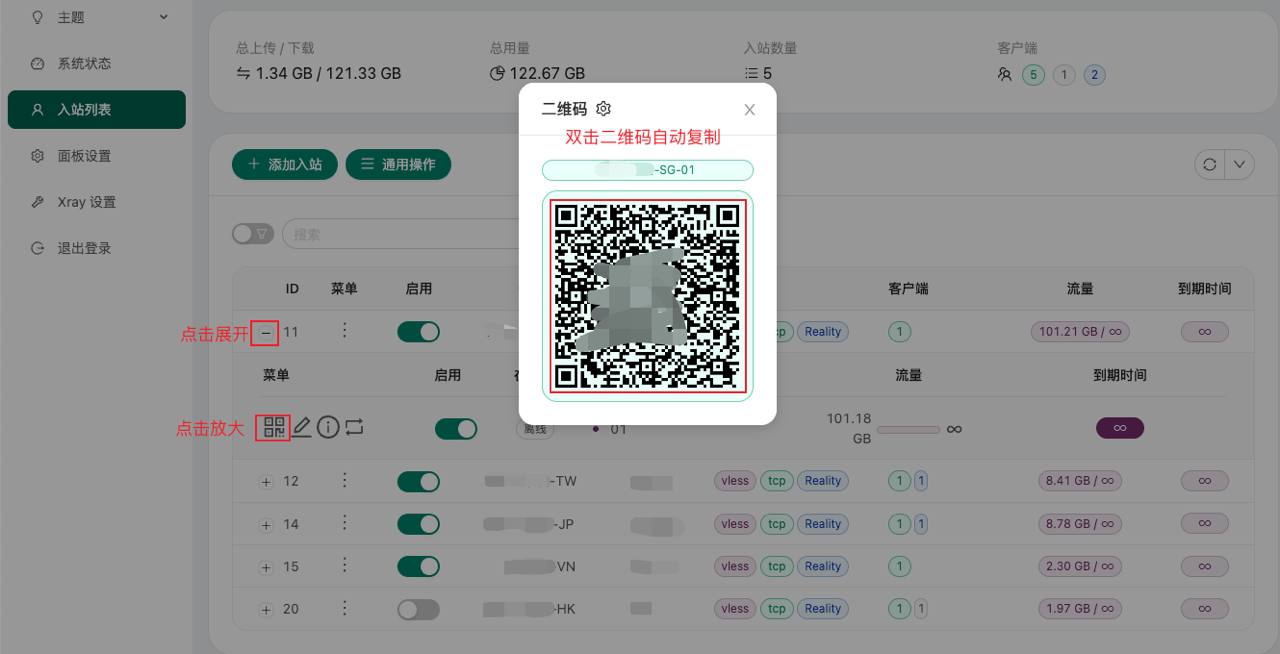
6、导出节点到V2rayN测试
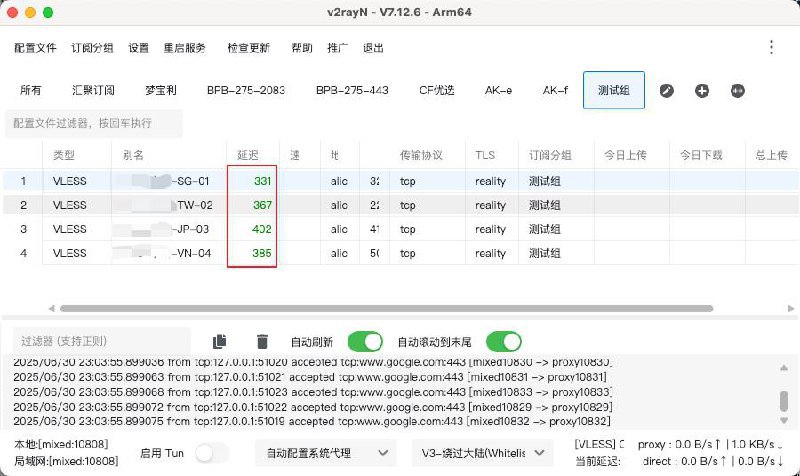
7、启用节点,查询落地
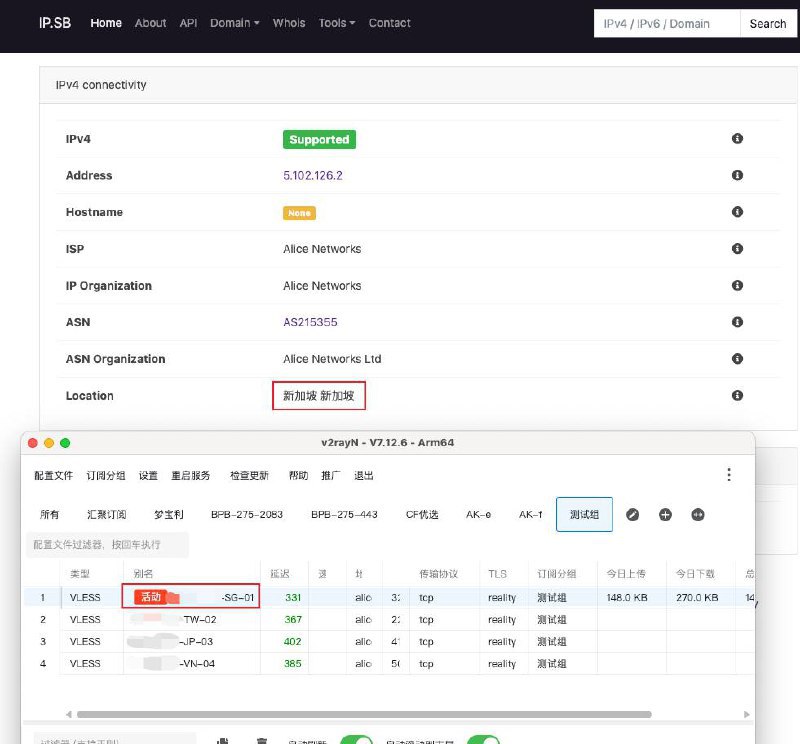
到这里就是直连5落地的方法,根据个人测速直连效果不佳,效果图就不上了,自己测速,推荐下面的进阶玩法。

中转玩法 GCP香港(需要开ipv6) 中转机 设置简略
- 安装3xui
- 添加任意门
- 手搓节点
1、跳过安装3xui(和上面步骤一样,不会的重复上面的第2步)
2、登录3xui面板,添加任意门协议,下面的地址 填写 Alice的v6 IP,端口 填写 alice 直连节点 端口
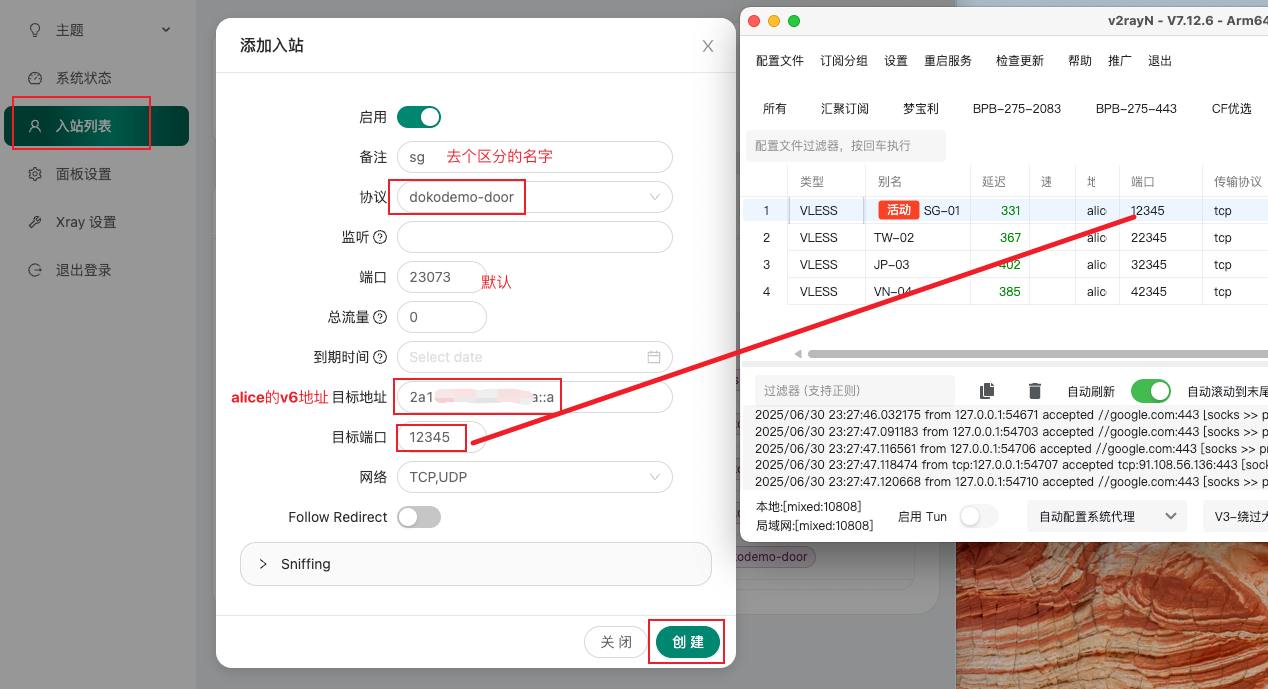
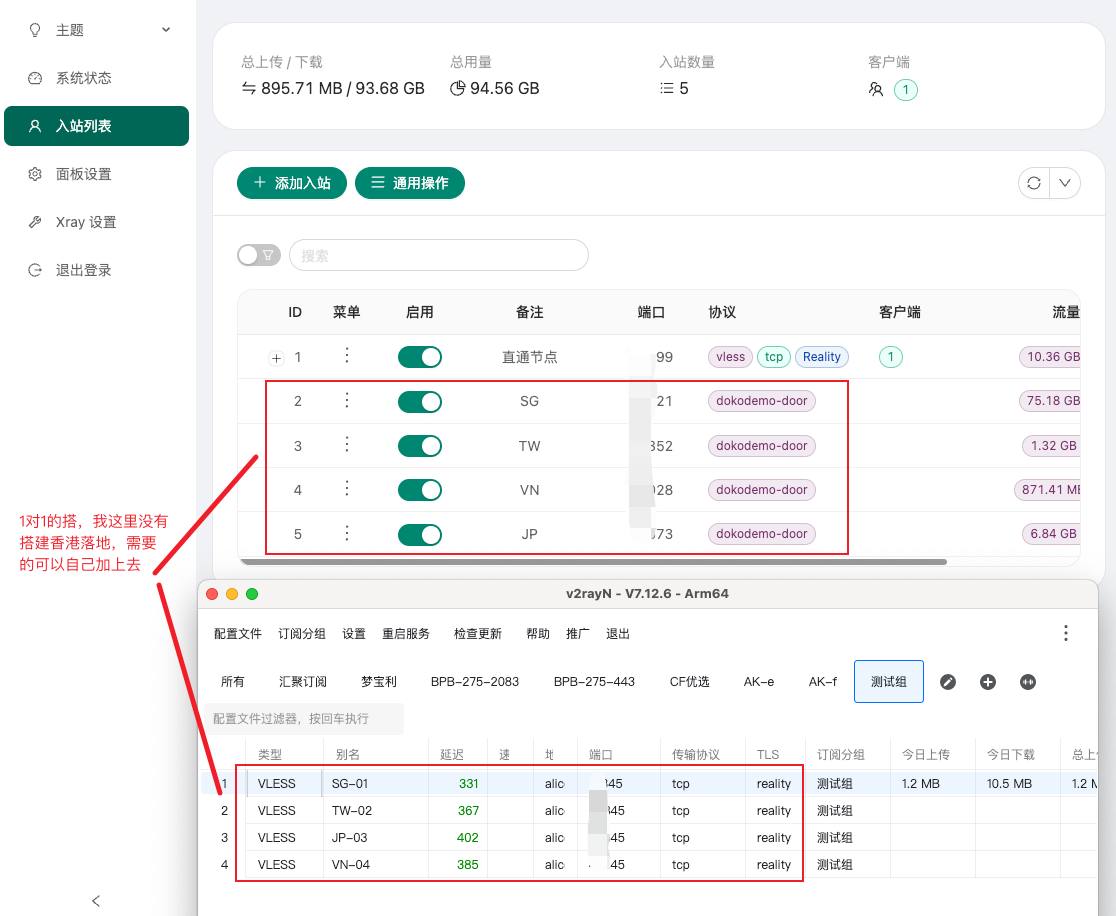
3、手搓节点
- 只需要将直连节点右键编辑修改
地址和端口两个地方就可以了 - 全部直连节点都需要按上面的修改,
地址是固定的,端口是door协议对应的
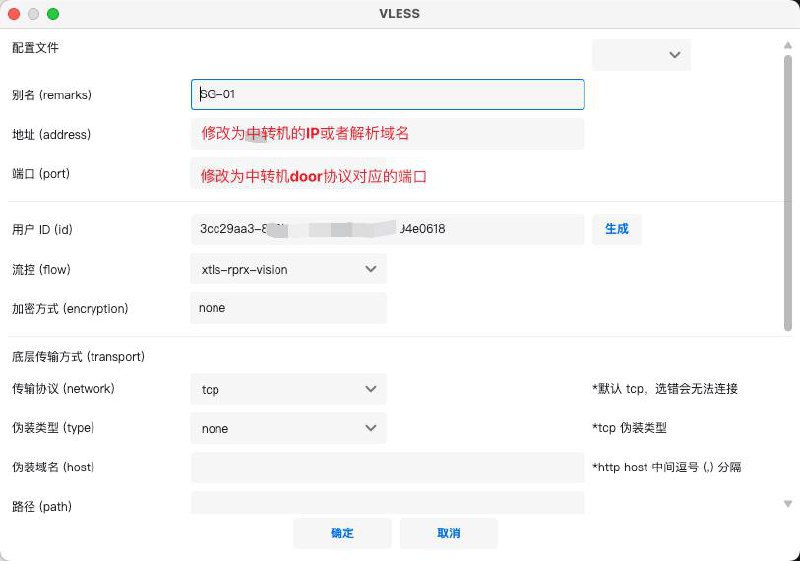
4、中转后效果
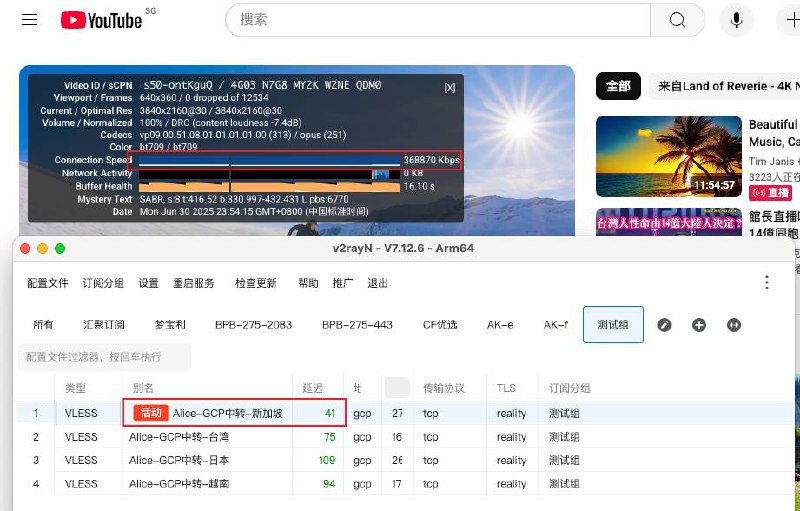
所以操作就是这么简单。效果就是这么丝滑!具体自测。
另,问:为什么不GCP香港直连?不是多此一举?
答:
1、首先、不是非得用GCP香港,我这是拿此鸡举例子;
2、其次、GCP香港本身的优势和缺点,优势是延时低速度快,缺点是如GPT、TK等不支持,配合alice落地优势补足短板。
3、最后、这个不是绝对玩法,你还可以选择别的方法,这里只是提供一种可能。
